A research design template for Notion that helps you defend your choice
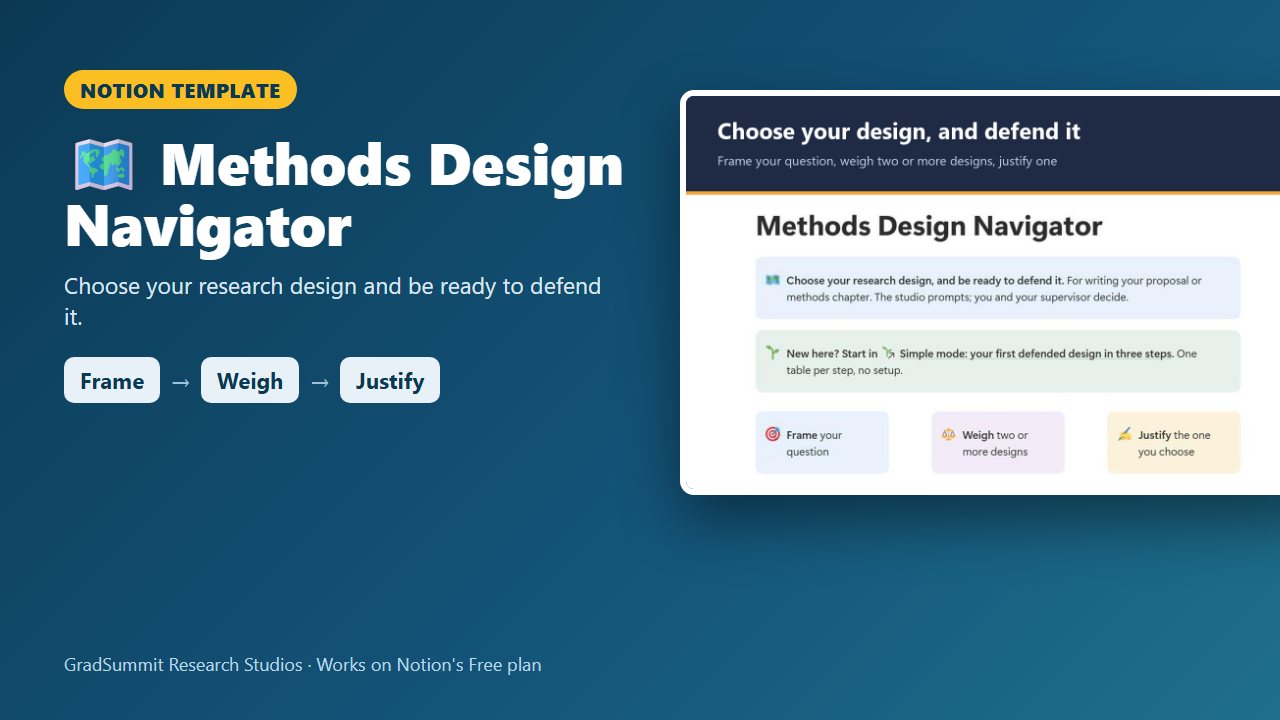
Weigh two or more candidate designs for each research question, log the threats each one carries, choose one with your reasons on record, and get a draft justification paragraph built from your own entries.
For master's and doctoral students writing a proposal or methods chapter, and anyone who will be asked "why this design and not another?" by a supervisor, ethics committee or examiner.
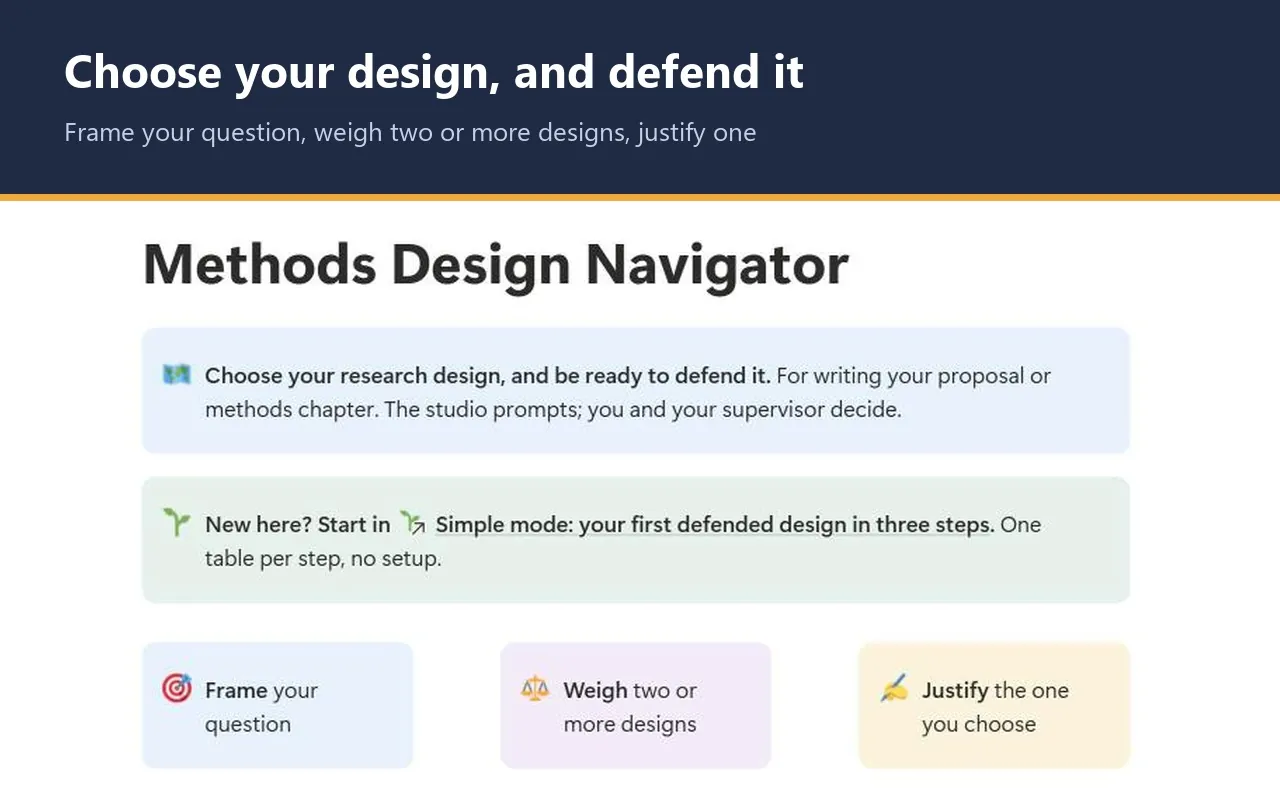
- Frame → Weigh → Justify
- Simple mode
- Works on Notion's Free plan
- Worked example
$12
One-time price. Checkout on Gumroad; an instant PDF with your link to duplicate the studio.
See inside the Methods Design Navigator
The problem it solves
"Why this design and not another?" Every supervisor, ethics committee and examiner asks it. "It seemed the most appropriate" is not an answer, and neither is naming the design you happened to start with.
A defensible methods section names the design, says why it fits the question and your constraints, lists the alternatives you considered with the reason each was set aside, and states the limitations you accept. Most students only write the first part, because they never weighed the alternatives on purpose.
The other trap is the mismatch between question and design. A mediation question answered with one survey wave can only show consistency with mediation, not mediation itself (Maxwell & Cole, 2007). A causal question answered with a cross-sectional design needs a stated limitation, or an examiner will supply one for you.
This studio has you record the reasoning while you make the choice, so the paragraph is already half-written when the question comes.
How it works: Frame → Weigh → Justify
Frame
Write your research question and pick what kind of question it is: descriptive, association, causal effect, mediation, moderation, lived experience, mixed, or secondary data analysis. A design prompt names the families worth weighing. It prompts; you decide.
Weigh
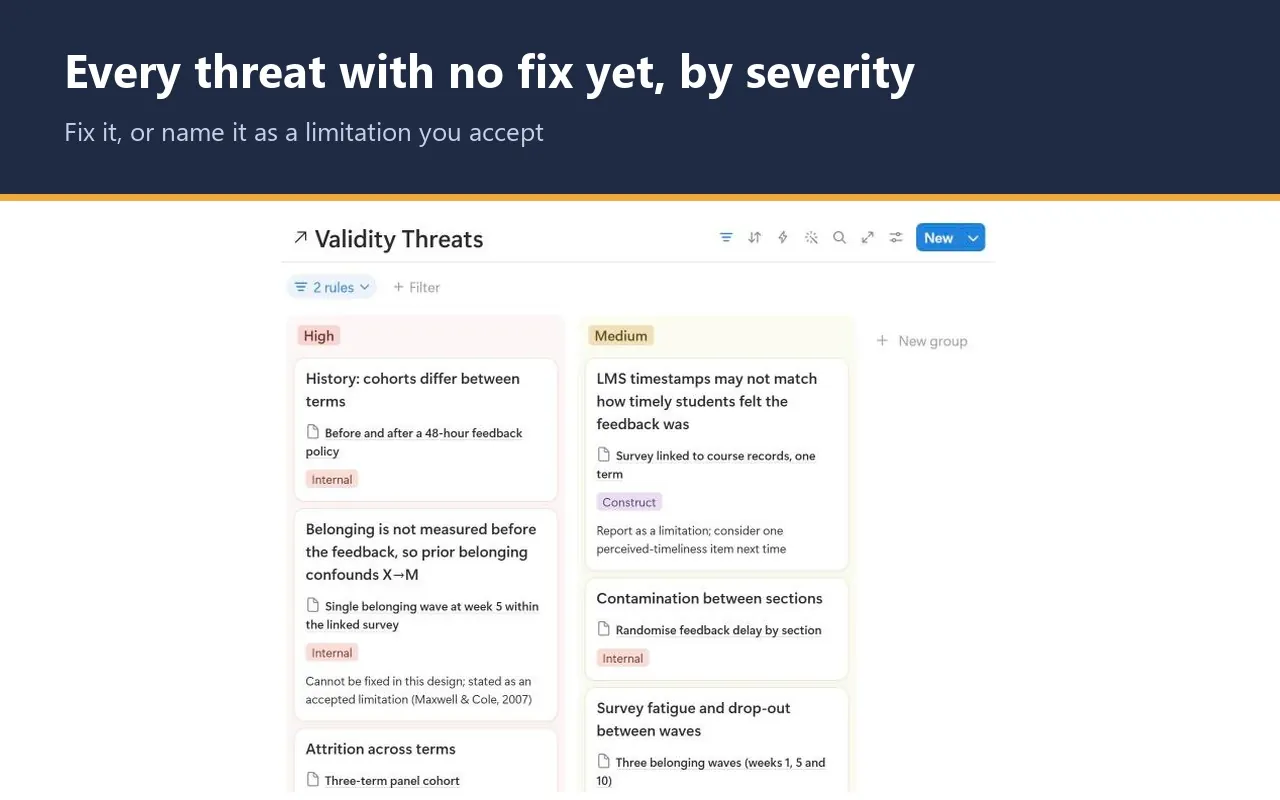
Add two or more candidate designs, including the one you would rather avoid. Tick the four feasibility checks (access, timeline, ethics, skills) and log each design's threats to validity with a severity and a mitigation.
Justify
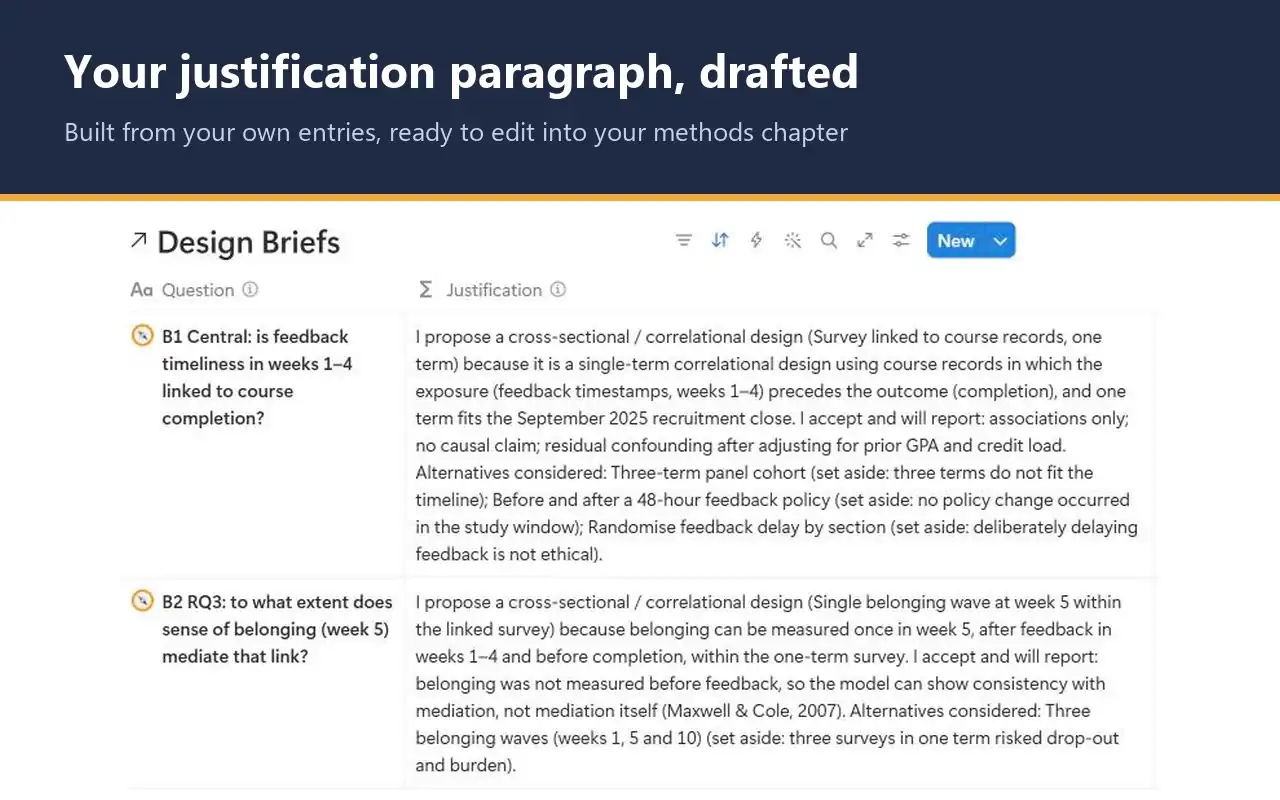
Mark one design Chosen with your rationale and the limitations you accept, and mark the rest Rejected with the reason. The studio drafts a justification paragraph from your own words.
What the studio checks for you
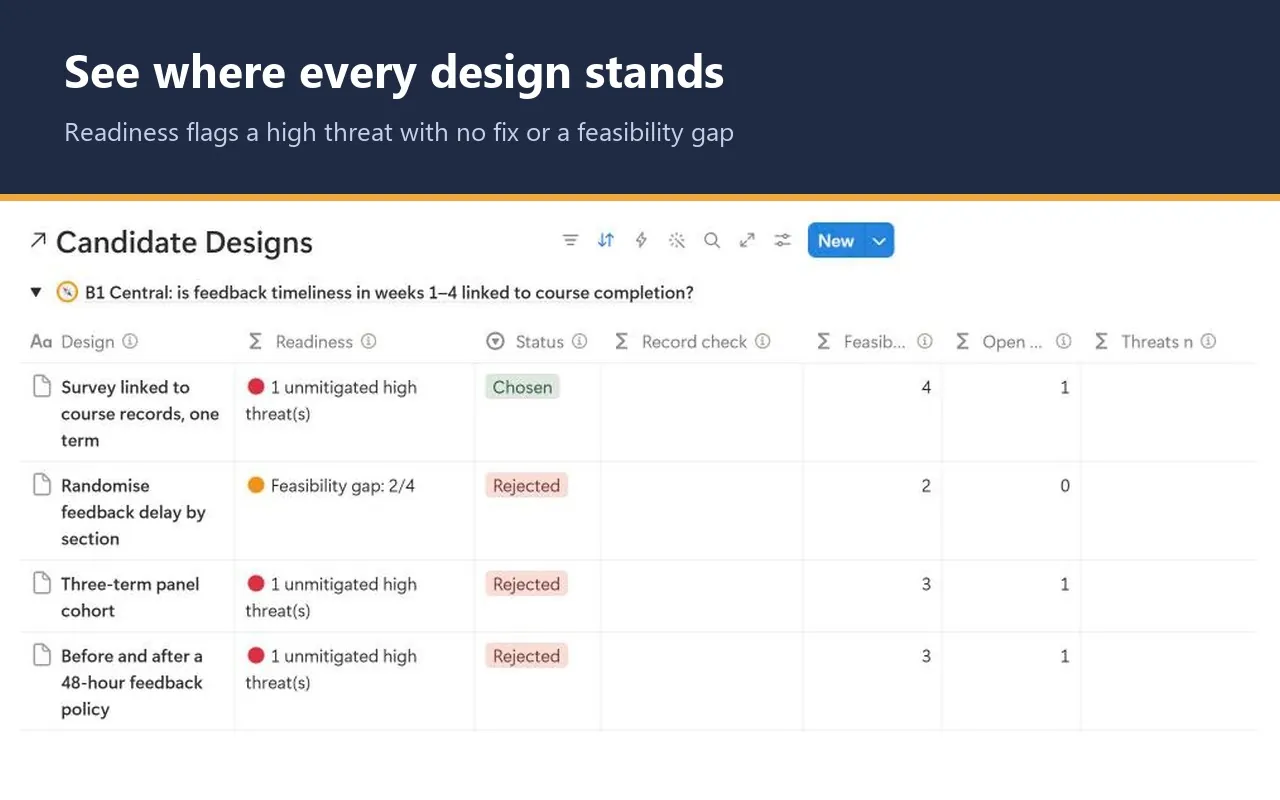
Each candidate design and each question carries a plain-language signal, worked out by formulas from what you enter. These are the labels you will see.
Readiness, per candidate design
- 📝 Log its threats first: no threats to validity logged for this design yet.
- ⚪ Set a severity for 1 threat(s): a logged threat still has no High, Medium or Low.
- 🔴 1 unmitigated high threat(s): a High threat is not ticked as mitigated, or is ticked with no real mitigation written.
- 🟠 Feasibility gap: 3/4: one or more of the four feasibility checks does not hold.
- 🟢 Ready to compare: threats rated, no open high threat, all four checks ticked.
Brief check, per question
- 📝 Add candidate designs: nothing weighed yet.
- ⏳ No design chosen yet: candidates exist, but none is marked Chosen.
- ⚠️ More than one marked Chosen: pick one.
- ⚠️ No alternatives recorded: a design is chosen, but nothing was rejected with a reason.
- ✅ Choice and alternatives recorded: one Chosen design with a rationale, alternatives with reasons, and nothing left Considering.
Record check, per design
- ⚠️ Add your rationale / ⚠️ Add why you set it aside: the reason is missing, or is a placeholder such as tbc or n/a.
- ⚠️ Name the open high threat(s) in Accepted limitations: you chose a design that still has an open high threat, without saying you accept it.
The design prompt rules and the Readiness signal are GradSummit conventions, labelled as such in the studio. ✅ in Brief check means your record is complete, not that the design is sound or approved.
The worked example
Fictional study
The worked example uses the fictional Brookfield study: whether timely instructor feedback is linked to course completion among first-generation students in online programmes. It has 2 questions, 6 candidate designs, 9 threats to validity and 2 decision log entries. For the central question, a survey linked to course records is chosen over a three-term panel cohort, a before-and-after policy study and a randomised design that would deliberately delay feedback. The second question asks whether belonging mediates the link; a single belonging wave is chosen with its 🔴 high threat named as an accepted limitation, to show that you can choose a design with a known weakness if you report it. Both questions reach ✅. Clearing the example takes a few minutes.
Method and sources
The studio draws on established design texts: Shadish, Cook & Campbell (2002) for the four validity types, Lincoln & Guba (1985) for qualitative trustworthiness, Creswell & Creswell (2023) for matching design to question, Creswell & Plano Clark (2018) for mixed methods, Creswell & Poth (2018) for qualitative traditions, Mann (2003) for observational designs, Kraemer et al. (2002) for moderators and Maxwell & Cole (2007) for mediation.
Quantitative validity types and qualitative trustworthiness criteria are kept separate, and the method page warns against mixing the two for one design. It also shows, step by step, how the design prompt and Readiness are decided.
What the studio does not do
- It does not choose your design. You and your supervisor do.
- The design prompt is a coarse rule set. It does not yet cover single-case designs, diagnostic accuracy studies, action research or Delphi studies.
- It does not judge whether your rationale is good, only whether a real one is written.
- The justification paragraph is a draft built from your entries. Edit it; it is not finished prose.
What you get
- A one-page PDF with your private link, sent by Gumroad straight after checkout. Click it, then Duplicate, and the studio is in your own Notion workspace, yours to keep.
- Simple mode: three steps, one small table each, with a plain instruction above every table. You can start in Notion for the first time today.
- Design briefs, candidates side by side, a board of threats with no fix yet, justification paragraphs and a decision log for when you change course.
- Export views that turn your briefs, designs, threats and decisions into clean CSV tables for an appendix.
- A Start here page, a method guide with full references, and a worked fictional example you can clear in a few minutes.
- Works on Notion's Free plan. No charts, no paid features and no Notion AI needed.
Questions
Does it cover qualitative and mixed methods designs?
Yes. The question types include lived experience and mixed (integration), the design families include phenomenology, grounded theory, ethnography, narrative, case study and the core mixed methods designs, and qualitative designs are judged on trustworthiness criteria rather than quantitative validity types.
Will it tell me which design is right?
No. The design prompt suggests families worth weighing, and Readiness shows where each candidate stands. The choice, and the reasons for it, stay yours and your supervisor's. The studio makes sure those reasons are written down.
Will I get updates?
The link in your PDF points to the published studio, so if it is updated you can duplicate the current version again. Your own copy never changes underneath you, which matters halfway through a methods chapter.
Does it work on Notion's Free plan?
Yes. The studio uses ordinary databases, relations, rollups and formulas. It needs no charts, no paid Notion features and no Notion AI, so the Free plan is enough.
How do I get the studio after I pay?
Checkout is on Gumroad. Straight after you pay $12, you get a one-page PDF with your private link. Open the link, click Duplicate, and the studio is copied into your own Notion workspace. It is yours to keep.
What if the link does not work or something is wrong?
Digital products cannot be returned once delivered, but if the link does not work or something is wrong with the studio, email rafiq@gradsummit.com and we will fix it or refund you.
Can my research group or class use it?
Each purchase is for one person. For a class or research group, email rafiq@gradsummit.com about a group licence.
Related guides and templates
Other research studios
Methods Design Navigator
Frame → Weigh → Justify, with a worked example and a method guide. $12, one-time.
Methods Design Navigator by Rafiq Muhammad, MD, MIHMEP, PhD (GradSummit). The example study and all its data are fictional and created for teaching.
Notion is a trademark of Notion Labs, Inc. GradSummit is not affiliated with or endorsed by Notion.