A CARE case report template for Notion, item by item
Put the case on a timeline in days, work through all 30 CARE checklist items, and clear consent and identifiability before you submit, with one line that names the next thing to fix.
For residents, junior doctors, nurses, pharmacists and other clinicians writing their first case report for a journal, with a supervisor or consultant who will check the draft.
- Map → Write → Clear
- Simple mode
- Works on Notion's Free plan
- Worked example
$12
One-time price. Checkout on Gumroad; an instant PDF with your link to duplicate the studio.
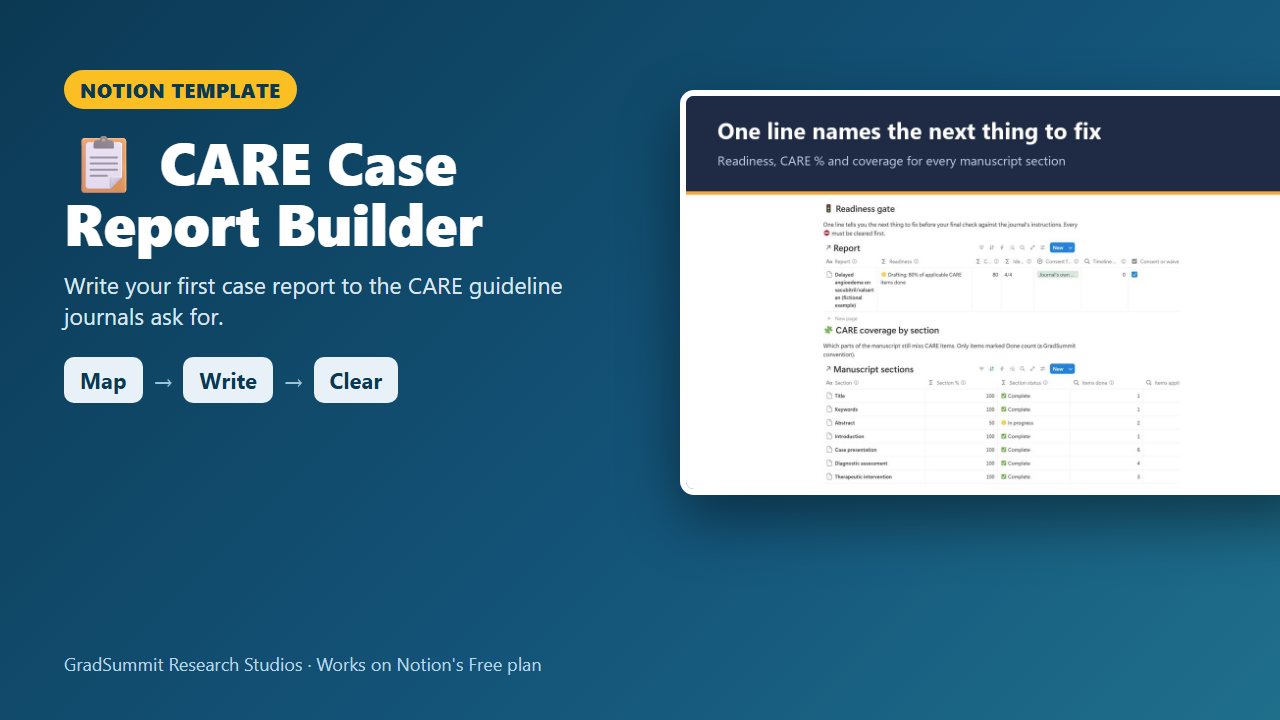
See inside the CARE Case Report Builder
The problem it solves
First case reports tend to come back for the same few reasons: no timeline, or one written in real dates; no patient perspective; a vague consent statement. None of these is about clinical skill.
The CARE guideline exists to fix this (Gagnier et al., 2013; Riley et al., 2017): 13 items, with sub-items, from the title to the timeline, the patient perspective and informed consent. But a checklist filled in at the end tends to be ticked from memory, not checked against the draft.
Then there is identifiability. The risk is rarely a name. It is a combination: an age, a job, a town, a rare condition and a date that together point to one person. Real dates are the easiest to remove, and the most often left in.
This studio has you record the case in relative days from the start, track each CARE item as you write it, and clear consent and identifiability before the draft is called ready.
How it works: Map → Write → Clear
Map
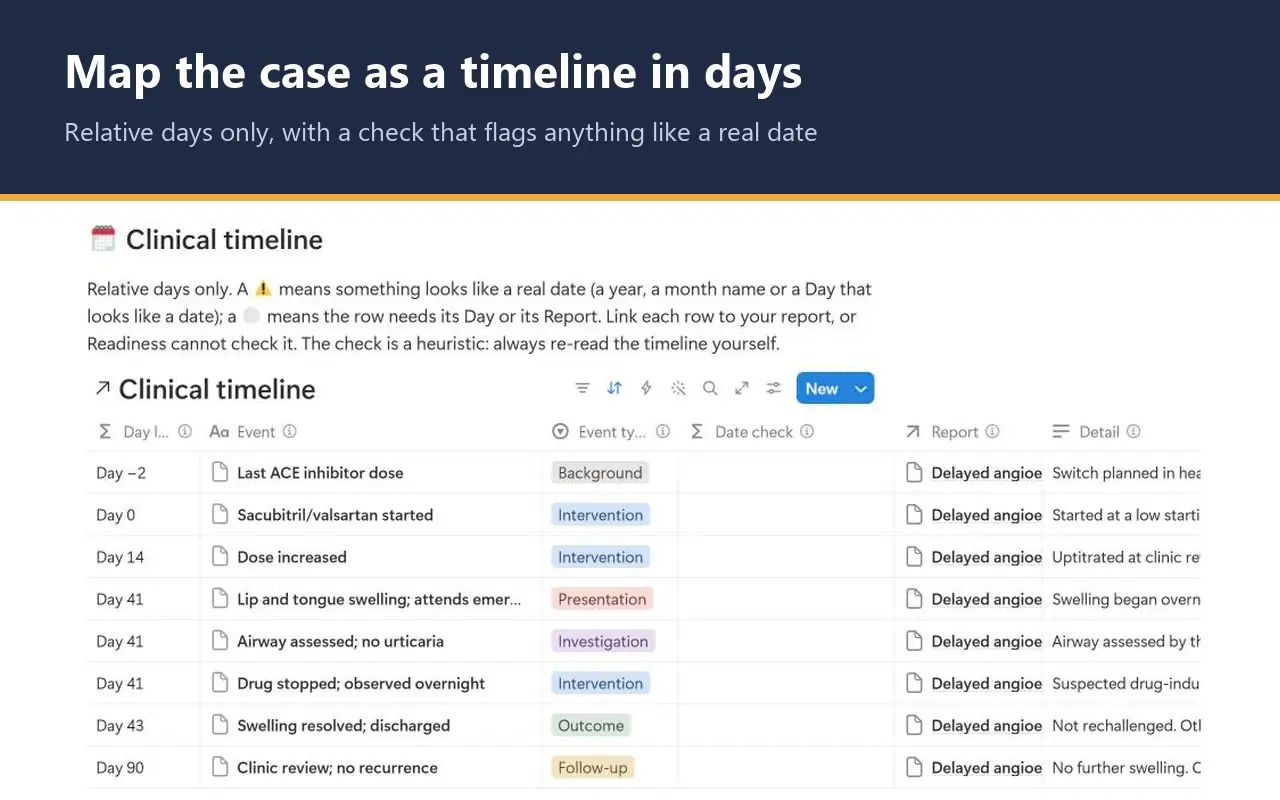
Choose a Day 0, for example the first dose of a new drug, and add one row per event in days from it, never a calendar date. A check flags any text that looks like a year or a month name.
Write
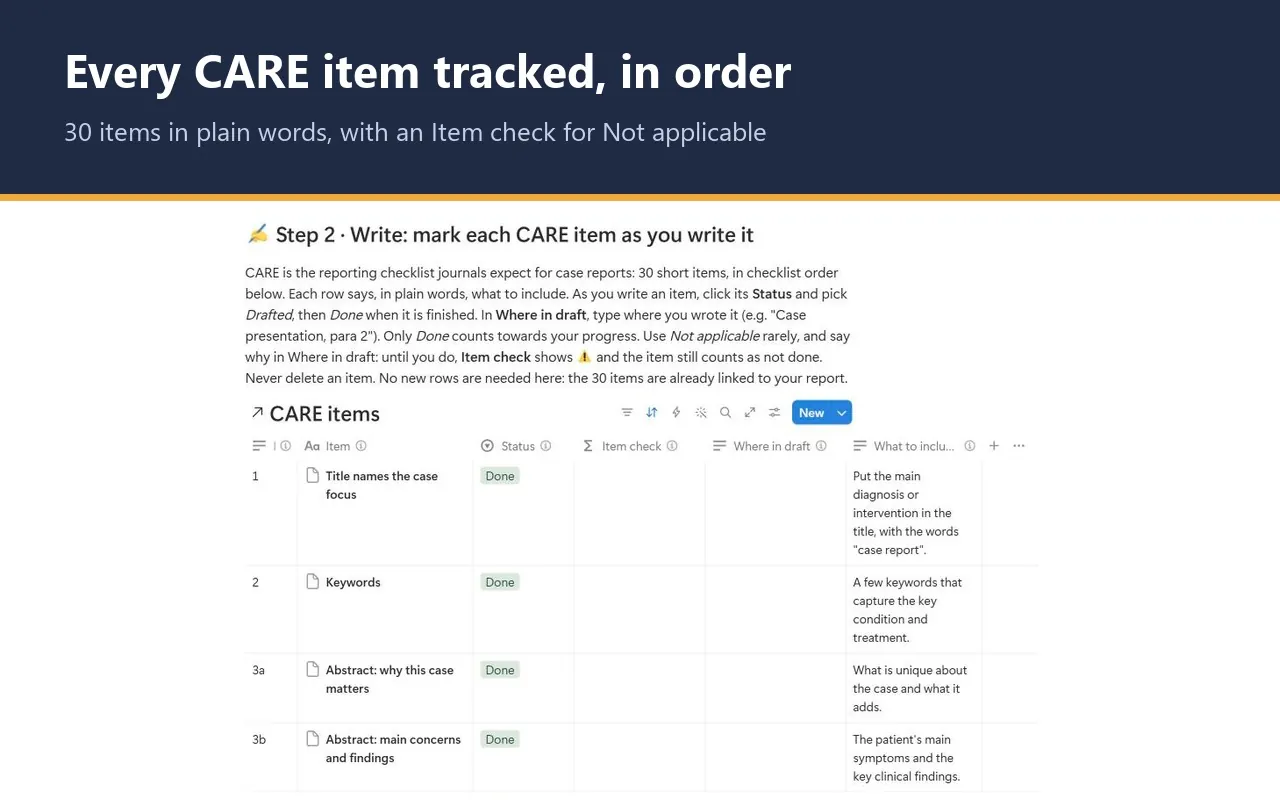
Work through the 30 CARE items in checklist order. Each one is linked to the manuscript section where you write it. Mark it Drafted, then Done, and note where in the draft it sits.
Clear
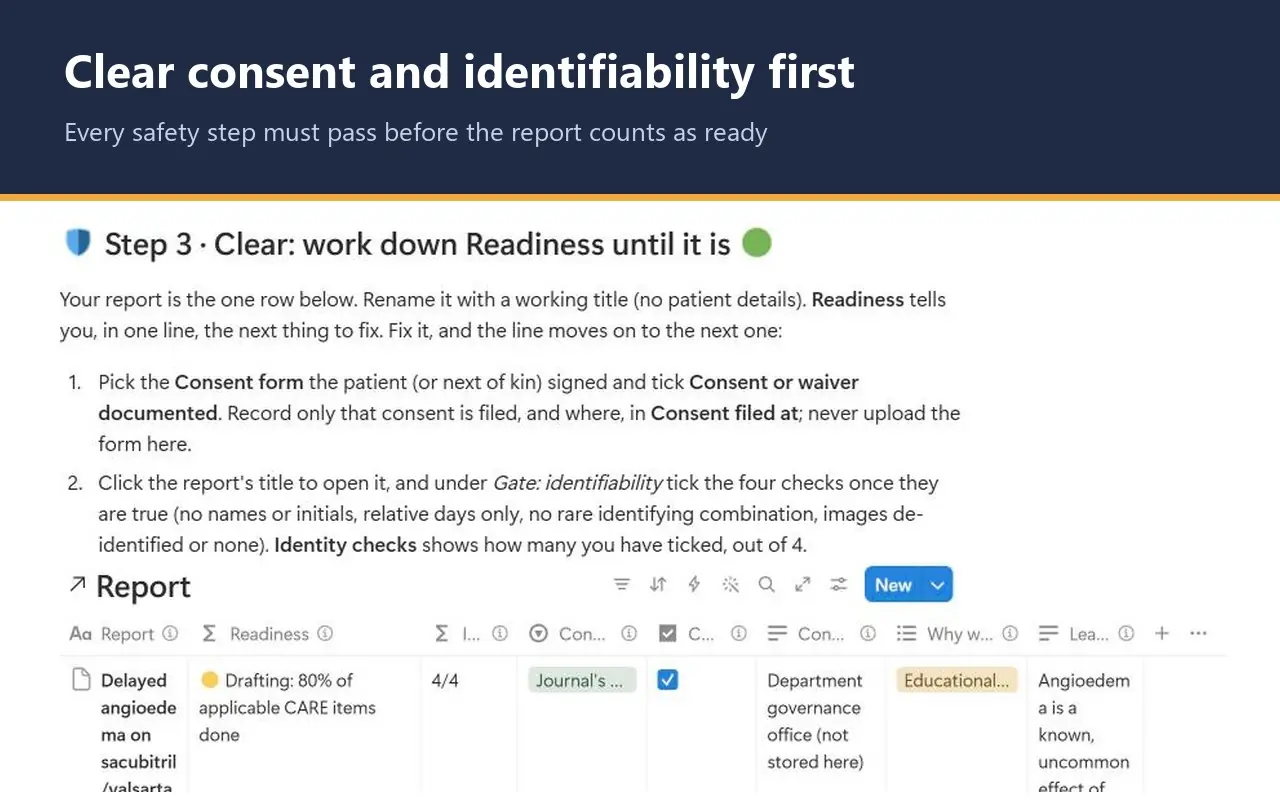
Record which consent form was signed and where it is filed, tick the four identifiability checks, and say why the case is worth reporting. The Readiness line then moves on to your remaining CARE items.
What the studio checks for you
Formulas turn what you enter into plain-language statuses. These are the main labels.
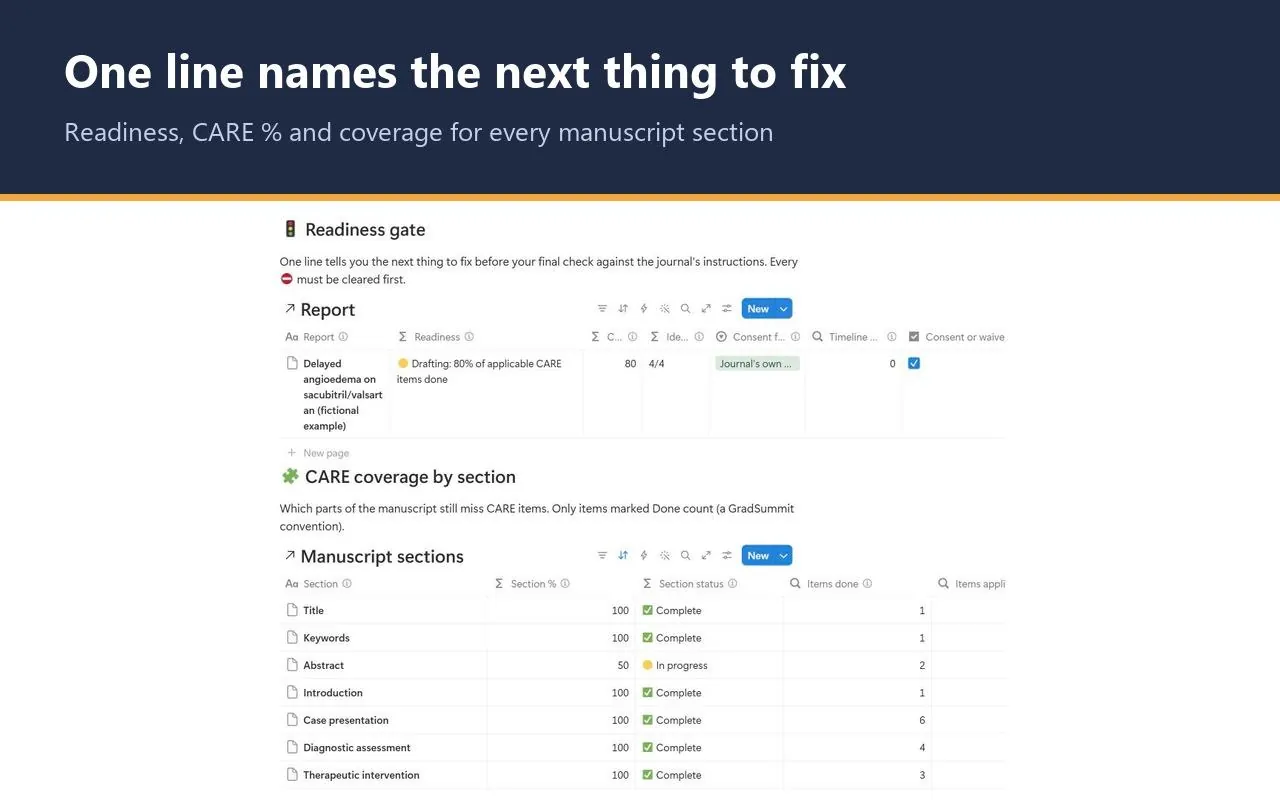
Readiness, on the report (checked in this order)
- ⚪ Not started: link the CARE items: the report has no CARE items linked yet.
- ⛔ Blocked: consent not documented in the form the journal requires: no consent form chosen, the box not ticked, or no real text saying where it is filed.
- ⛔ Blocked: identifiability check incomplete: fewer than four of the identity boxes are ticked.
- ⛔ Blocked: a timeline entry looks like a real date: at least one linked timeline row is flagged.
- ⚠️ State why this case is worth reporting: no reason picked, or no real learning point written.
- 🟠 Waiver: most journals and ICMJE expect consent from the patient or next of kin; keep the journal written agreement on file: you chose a waiver. A waiver never reaches green.
- 🟡 Drafting: 80% of applicable CARE items done: the safety steps are clear; the percentage is your progress.
- 🟢 Ready for final author check against the journal instructions: every applicable item Done. It means ready for your own final check, not accepted.
Checks on the CARE items and the timeline
- ⚠️ Say why in Where in draft: an item is marked Not applicable without a reason. Until you give one, it still counts as not done.
- ⚠️ Looks like a date: use relative days: the timeline row contains a four-digit year or a month name.
Counting only Done items towards the percentages is a GradSummit convention, and the studio says so. The date check is a heuristic: it catches years and month names, not every way a date can be written, so re-read the timeline yourself.
The worked example
Fictional study
The worked example is fictional: a Mercy General case of a man in his late 60s with heart failure who develops lip and tongue angioedema on Day 41 of sacubitril/valsartan, a known but uncommon effect. It has 1 report, 30 CARE items (24 Done), 11 manuscript sections, 8 timeline events from Day −2 to Day 90 and 4 literature rows, which are placeholders to replace with your own search. Consent is recorded and all four identity checks are ticked, so Readiness shows 🟡 Drafting: 80% of applicable CARE items done. Clearing the example takes a few minutes.
Method and sources
The studio follows the CARE guidelines: the consensus checklist (Gagnier et al., 2013) and its explanation and elaboration document (Riley et al., 2017). The item labels are short paraphrases; the method page links to the official checklist at care-statement.org so you can check the exact wording before you submit. Consent and de-identification follow the ICMJE Recommendations on protecting research participants.
The method page shows how the steps map to CARE (the timeline is item 7, consent item 13) and how Readiness is decided. For a suspected adverse drug reaction, it asks you to state how you assessed causality, for example with the Naranjo scale (Naranjo et al., 1981).
What the studio does not do
- It does not verify consent. It records that you say consent was obtained and where the form is kept. Keep the form itself in your organisation's records, never in Notion.
- It does not judge causality or guarantee acceptance.
- It is not a records system or a compliance tool. Never enter identifiable patient details.
- The example is fictional and is not clinical guidance.
What you get
- A one-page PDF with your private link, sent by Gumroad straight after checkout. Click it, then Duplicate, and the studio is in your own Notion workspace, yours to keep.
- Simple mode: three steps, one small table each, with a plain instruction above every table. You can start in Notion for the first time today.
- A Readiness gate, CARE coverage by manuscript section, a board of items to finish, a clinical timeline, an is-it-worth-reporting check and a literature comparison table.
- Export views that turn your checklist, section coverage, timeline and literature comparison into clean CSV tables for your supervisor.
- A Start here page, a method guide with full references, and a worked fictional example you can clear in a few minutes.
- Works on Notion's Free plan. No charts, no paid features and no Notion AI needed.
Questions
Does it replace the official CARE checklist?
No. The studio tracks all 30 CARE items in short, paraphrased form, linked to where you write each one. Before you submit, read the official checklist at care-statement.org, which the method page links to, and use it for the journal's own checklist upload if one is required.
Can I enter real patient details if my workspace is private?
No. Write the timeline in relative days and leave out names, initials, record or hospital numbers, real dates and rare combinations of details. The studio records only that consent is filed and where. The signed form stays in your organisation's records.
Will I get updates?
The link in your PDF points to the published studio, so if it is updated you can duplicate the current version again. Your own copy never changes underneath you, which matters halfway through a case report.
Does it work on Notion's Free plan?
Yes. The studio uses ordinary databases, relations, rollups and formulas. It needs no charts, no paid Notion features and no Notion AI, so the Free plan is enough.
How do I get the studio after I pay?
Checkout is on Gumroad. Straight after you pay $12, you get a one-page PDF with your private link. Open the link, click Duplicate, and the studio is copied into your own Notion workspace. It is yours to keep.
What if the link does not work or something is wrong?
Digital products cannot be returned once delivered, but if the link does not work or something is wrong with the studio, email rafiq@gradsummit.com and we will fix it or refund you.
Can my research group or class use it?
Each purchase is for one person. For a class or research group, email rafiq@gradsummit.com about a group licence.
Related guides and templates
Other research studios
CARE Case Report Builder
Map → Write → Clear, with a worked example and a method guide. $12, one-time.
CARE Case Report Builder by Rafiq Muhammad, MD, MIHMEP, PhD (GradSummit). The example study and all its data are fictional and created for teaching.
Notion is a trademark of Notion Labs, Inc. GradSummit is not affiliated with or endorsed by Notion.